KDD Cup 2026 Data Agents
发布于
构建能够分解复杂分析问题、协调异构数据源上的多步骤推理并提供准确答案的自主人工智能代理。
比赛概览
比赛目标是构建 Data Agents for Complex Data Analysis ,强调多步规划、工具调用、异构数据分析。
常见的Agent执行流程如下:
- 任务分解与规划:自主将高层次的分析问题分解成多步骤、可执行计划。
- 工具选择与调用:在每个推理步骤中选择并调用合适的工具(Python脚本、SQL查询、API调用)
- 异构数据推理:对结构化表格、非结构化文档、图表和多模态数据源进行推理。
- 结果综合:综合多个步骤中的中间结果,得出最终的准确答案。
Data Agent和通用Agent的区别?
我的问题:Data Agent与通用Agent的区别是什么?通用Agent明明也可以分析数据,调用工具,结果综合。如果模型很强,通用Agent也可以很好的分析数据呀?
推理与执行的拓扑结构
通用Agent:线性思考/迭代循环
- 大多数通用Agent采用的是类似ReAct(Reasoning and Acting)的线性结构,即”思考 -> 行动 -> 观察 -> 再思考”的单线循环。
Data Agent:复杂DAG结构
- 真实的数据分析很少是一条直线。比如KDD Cup中提到的,Data Agent需要具备构建有向无环图(DAG)的能力。它需要把一个大问题拆解成并行的子任务(如:一边去SQL数据库查销售额,一边去PDF报告里提取增长率),分别执行后,再将多路结果进行”汇合(Merge)“和综合计算。
状态管理与上下文处理
通用Agent:直接读取
- 倾向于将获取到的信息直接塞进模型的上下文窗口里进行阅读理解。但在数据分析中,一张表可能有几百万行,直接塞入不仅会超出Token限制,还会导致模型的注意力严重分散。
Data Agent:中间状态管理
- 具备中间状态管理能力。它不会把数据本身读入大模型,而是通过模式生成SQL或Python代码,在外部沙河环境中执行,并在内存中保留数据帧的状态。它只把数据的表结构、统计摘要或报错信息返回给模型。
异构数据的联合推理
通用Agent:
- 多模态通常用于辅助理解,比如你给它截图一个 UI 界面,让它写出对应的 CSS 样式。
Data Agent:理解跨模态数据分析
- 专门针对跨模态的数据”对齐”进行了优化。它能够理解业务逻辑在不同数据源之间的关联。例如,它能理解图表中的”Q3目标”需要与SQLite数据库中的”实际业绩”进行比对,并且还要参考一份word商业手册中的”业绩计算规则”来写代码。这种跨库、跨文件的逻辑串联是专精的方向。
定制数据工程异常
通用Agent:
- 纠错逻辑通常基于 确定性的异常 。代码编译失败了、依赖包冲突了、或者 API 抛出了 500 错误,Agent 捕捉到这些明确的 Error Trace,然后去修改逻辑。
Data Agent:
- 具有深度的代码调试(Debugging)和自我反思(Self-reflection)机制。如果 SQL 报错,它会去查阅数据库的 Schema 字典;如果 Python 处理缺失值(NaN)失败,它会自动插入数据清洗的代码。它的纠错逻辑是专门为数据工程异常(如类型不匹配、索引越界、空值)定制的。
比赛规则
比赛规则似乎还在不断完善中,请直接查看官网以获取最准确的信息:KDD Cup 2026: Data Agents for Complex Data Analysis
基础知识
ReAct
过去的语言模型在推理和执行动作方面的能力都在不断增强,但这两种能力是各自独立发展的,没有结合起来。
- 推理:模型在内部生成推理轨迹来自我引导,形成一个闭环。
- 行动:模型直接输出动作指令与外部环境交互,通过环境反馈的观察结果来被动决定下一步操作的循环过程。
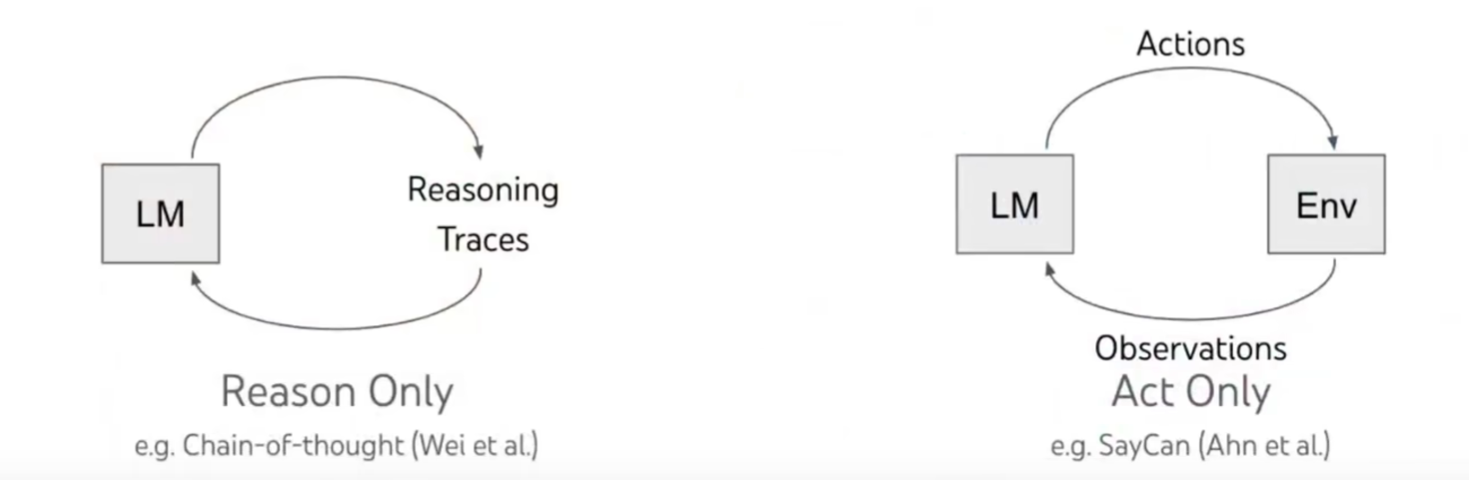
这正是RaActing诞生的直接背景,研究人员意识到,必须把内部的Reasoning(推理规划)和外部的Acting(环境交互)缝合进同一个闭环里。在采取动作前先想一想为什么这么做,收到环境的反馈后再想一想接下来该怎么调整。
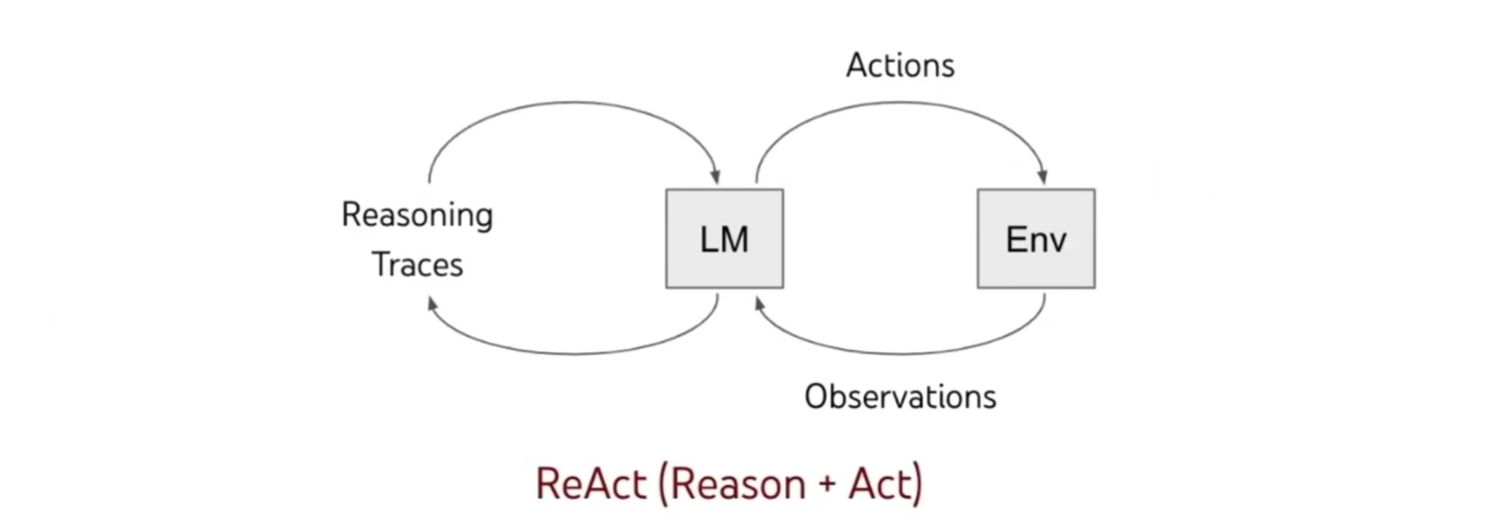
ReAct的核心运行机制:
推理指导行动,行动支持推理。
ReAct框架通常通过一个被称为”思考-行动-观察”(Thought - Action-Observation)的循环来运行:
- 思考:模型首先对当前的任务或问题进行逻辑推理,规划下一步需要做什么
- 行动:基于思考的结果,模型决定调用外部工具或API(比如搜索引擎、计算器、数据库查询、甚至是一段Python代码)
- 观察:外部工具执行后,将结果返回给模型。模型观察这些新信息
- 循环或输出:模型根据观察到的新信息,进行新一轮的思考。如果信息已经足够得出最终结论,模型就会停止循环并输出答案。
ReAct优势:
- 通用且灵活
- 强大且具备泛化能力
- 可解释且可控
一个ReAct的例子:
用户提问:“PyTorch 的主要创建者是谁?他目前在 Meta 担任什么具体职位?”
Step1:拆解问题,寻找第一块拼图
- 思考: 我需要回答两个问题。首先,我得弄清楚 PyTorch 的主要创建者或核心领导者是谁。我应该先搜索这个信息。
- 行动:
Search("PyTorch primary creator or founder") - 观察: [外部 API 返回结果] “PyTorch 最初由 Meta AI(前身为 FAIR)开发,主要由 Soumith Chintala 领导并作为联合创始人推出…”
Step2:基于新线索,发起第二次探索
- 思考:现在我知道了 PyTorch 的核心人物是 Soumith Chintala。接下来,我需要找出他目前在 Meta 公司担任的具体职位是什么。
- 行动:
Search("Soumith Chintala current title Meta") - 观察:[外部 API 返回结果] “Soumith Chintala 目前在 Meta 担任杰出工程师(Distinguished Engineer)及人工智能研究员…”
Step3:综合信息,得出最终结论
- 思考:我已经集齐了所有需要的信息。PyTorch 的创建者是 Soumith Chintala,他现在的职位是 Meta 的杰出工程师和 AI 研究员。信息足够,可以结束任务并输出答案了。
- 行动:
Finish("PyTorch 的主要创建者是 Soumith Chintala,他目前在 Meta 担任杰出工程师(Distinguished Engineer)和 AI 研究员。")
Function Calling
语言模型本身只能生成文本,无法与现实世界进行交互。Function Calling是一种机制,它允许我们向大模型提供一组预先定义好的工具(函数)及其说明。当用户提出问题时,大模型会自主判断是否需要使用这些工具来回答问题。如果需要,它会准确的输出需要调用的函数名称以及相应的参数,交由外部程序去执行。
Function Calling工作流程
-
定义工具:开发者向大模型描述有哪些函数可用。例如,定义一个查天气的函数
get_weather(location),并告诉大模型这个函数的作用是”获取指定城市的天气”,且必须提供location参数 -
用户提问:用户输入指令,例如:北京今天需要带伞吗?
-
模型决策:大模型分析问题,发现自己不知道北京今天的实时天气,但它知道可以使用
get_weather这个工具。于是它不会直接回答问题,而是输出一段结构化的数据:{ "function_name": "get_weather", "arguments": { "location": "北京" } } -
本地执行:Agent的底层代码接收到这个JSON指令,在本地或云端真实运行
get_weather("北京")这个函数,并通过气象API获取到结果 -
返回结果:Agent将执行结果喂给大模型
-
最终回答:大模型结合这个外部真实数据,生成最终自然语言回复
Function Calling 的实现机制:
-
System Prompt 注入 在底层,你提供给大模型的工具列表,会被框架自动转换成特定格式,并悄悄塞进系统提示词。大模型看到的其实是这样一段描述:
“你是一个助手。你现在拥有以下工具可以调用: 工具名:get_weather 描述:获取指定城市的天气。 参数要求:需要一个名为 location 的字符串。” -
针对性模型微调 支持Function Calling的模型在出厂前,都经过海量工具调用数据的微调训练。模型被训练出一种特定的条件反射:当他发现用户的意图与System Prompt中某个工具高度匹配时,它会抑制自己直接输出答案的冲动,转而严格按照要求的Json格式输出一串包含函数名和参数的代码。
-
状态码与代码拦截 这是最关键的阶段。当模型决定调用函数时,它返回给服务器的响应体中,包含一个特殊的状态码(例如在 OpenAI/Gemini API 中,
finish_reason会变成tool_calls而不是正常的stop)。底层代码的循环机制会捕捉到这个状态码:
- 如果
finish_reason == stop:说明模型在正常说话,直接把文本展示给用户。 - 如果
finish_reason == tool_calls:程序会拦截这段响应,将其中的 JSON 参数提取出来,在本地运行真正的 Python/Node.js 函数,拿到结果后,将结果拼接成新的系统消息再次发给大模型。
- 如果
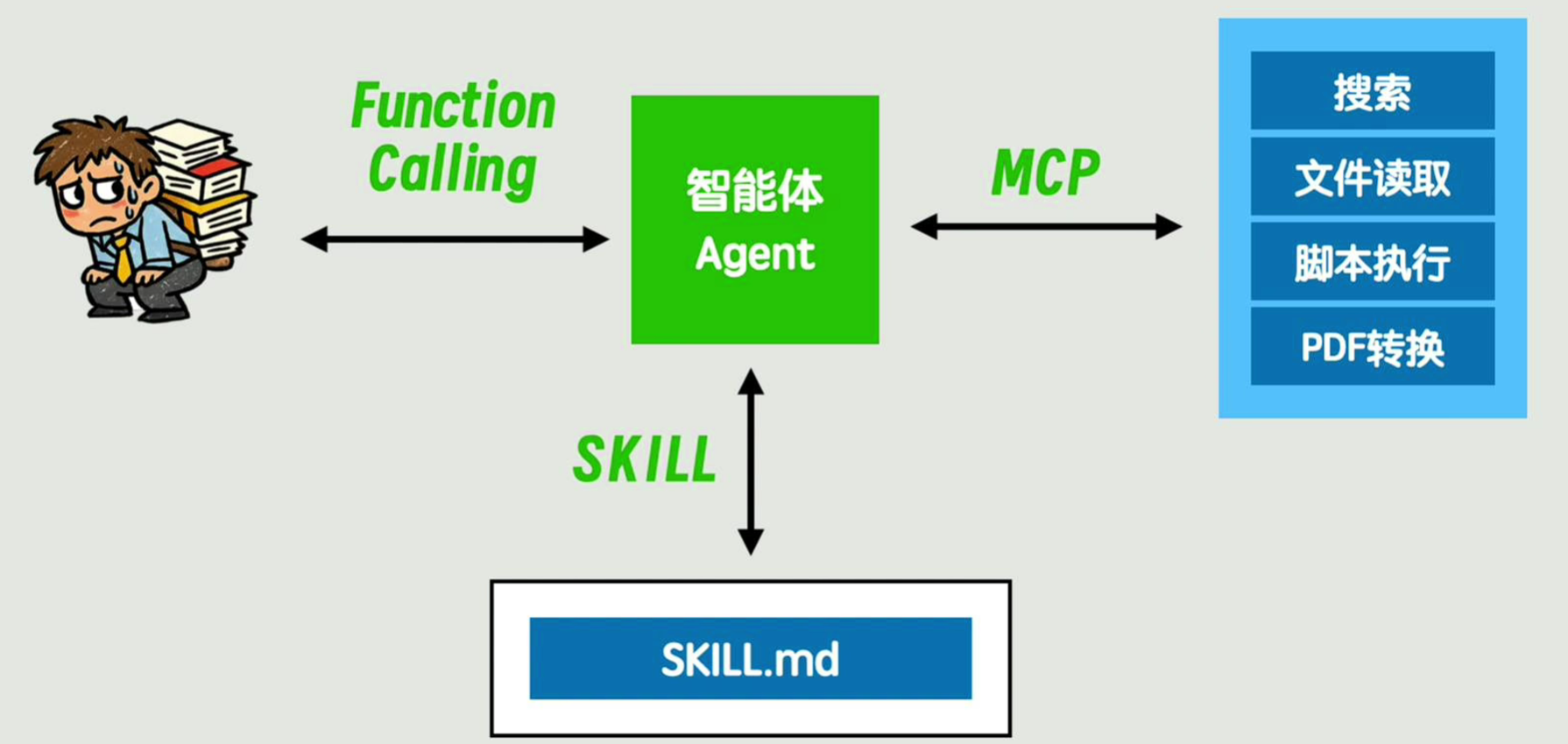
与Skills和MCP的关系
Function Calling:底层引擎(最基础的齿轮)
Function Calling是大模型的一项原子能力。它解决的是:“模型如何输出结构化指令,让外部代码去执行”。解决大模型本身与Agent之间的通信。
- 定位:API层面的基础机制
- 本质:Json Schema的生成与解析
- 比喻:汽车的发动机。它只负责输出动力(Json指令),并调用功能。
Skills:输入****逻辑封装
直接使用Function Calling时,直接把一个个零散的函数扔给模型太混乱了,同时也占用了大量的上下文。于是各自框架提出了更高的抽象层Skills。
- 定位:应用开发层面的概念封装
- 本质:将特定的 Function Calling、相关的 Prompt 以及本地化代码 打包在一起 ,形成一个高内聚的业务能力。例如,一个“邮件处理 Skill”可能包含了“读邮件”、“写邮件”、“发送邮件”三个底层 Function。同时渐进式披露解决了占用大量上下文的问题。
- 比喻:汽车的 空调系统或音响系统 。它将多个底层齿轮和电路封装成一个完整的、可以直接按键使用的功能模块。
MCP:通用连接标准(与外部连接)
它是一个标准化的网络通信协议。当大模型派发的任务是 “获取外部信息”或“执行物理动作” (比如“帮我把那份 PDF 转成文本拿过来”)时,Agent 就通过 MCP 协议接通右侧的工具箱。
- 定位:跨平台、跨生态的标准化通信协议
- 本质:MCP 制定了一套标准的 Client-Server 架构。MCP Server 负责连接本地文件、Github、数据库等外部环境;Agent通过标准化协议去读取上下文和调用工具。
一句话总结:Function Calling 是底层的原子动作,Skills 是把动作组合成有业务价值的工具包。
Baseline
Github地址:HKUSTDial/kddcup2026-data-agents-starter-kit
Phase1数据集下载地址:demo_samples.zip - Google 云端硬盘
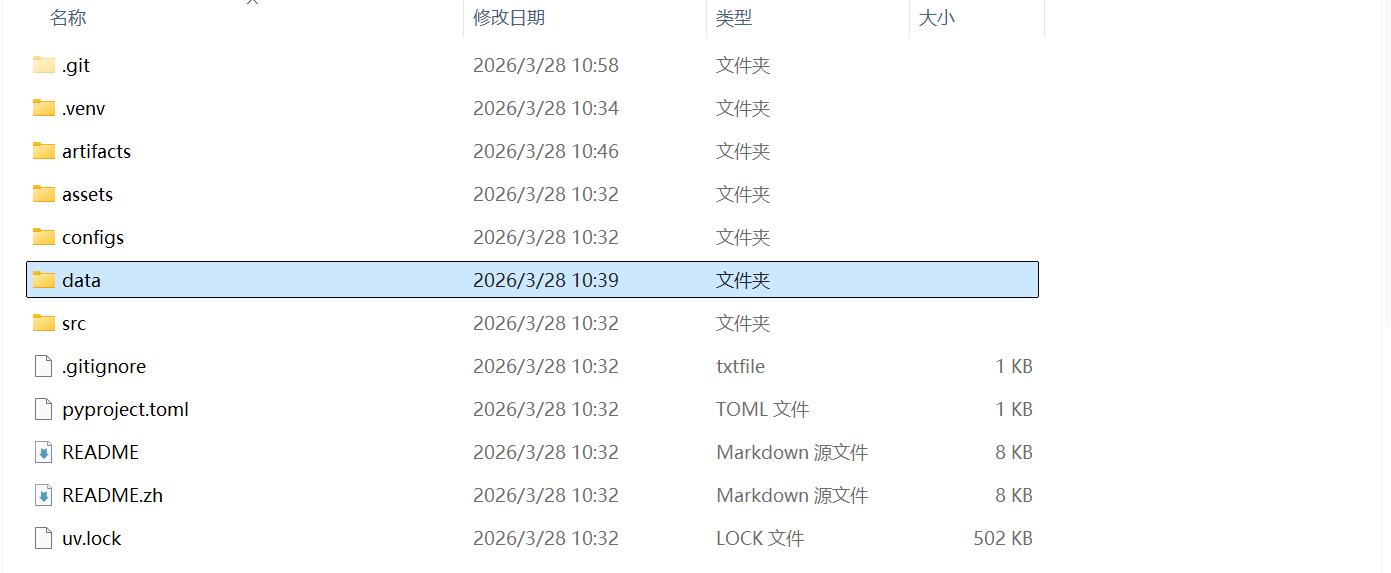
克隆start-kit仓库,以及下载数据集后,将数据集解压放在项目目录下,并改名为data:
安装uv:
powershell -ExecutionPolicy ByPass -c "irm https://astral.sh/uv/install.ps1 | iex"在项目环境下安装依赖:
uv sync检查项目目录完整性:
uv run dabench status --config configs/react_baseline.example.yaml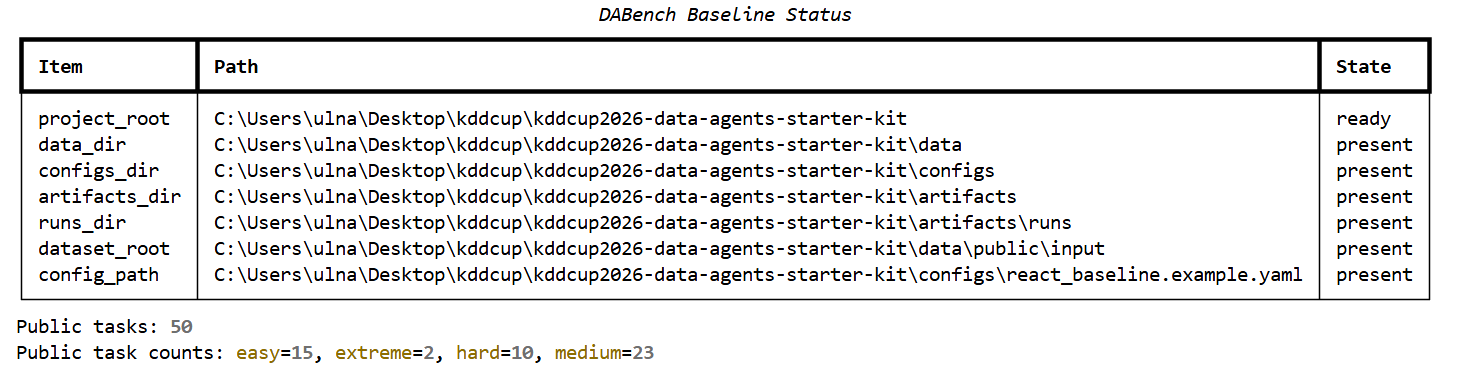
如果
artifacts_dir文件夹不存在,不用担心, 是因为你还没有运行过项目。
运行baseline:这会执行所有的任务。
uv run dabench run-benchmark --config configs/react_baseline.example.yaml只运行一个task,如task_11:
uv run dabench run-task task_11 --config configs/react_baseline.example.yaml运行Baseline:

Windows环境下的bug
在运行baseline的过程中我发现一个有意思的现象,现象内容如下:
我在两个不同的终端中,先后(间隔10秒以内)加载两个不同的配置文件运行程序,这两个程序的配置只有 task_timeout_secondes这个参数不同。
程序1:
- 参数:
task_timeout_seconds: 0
代码直接走:
if timeout_seconds <= 0:
        return _run_single_task_core(task_id=task_id, config=config)
执行情况如下:
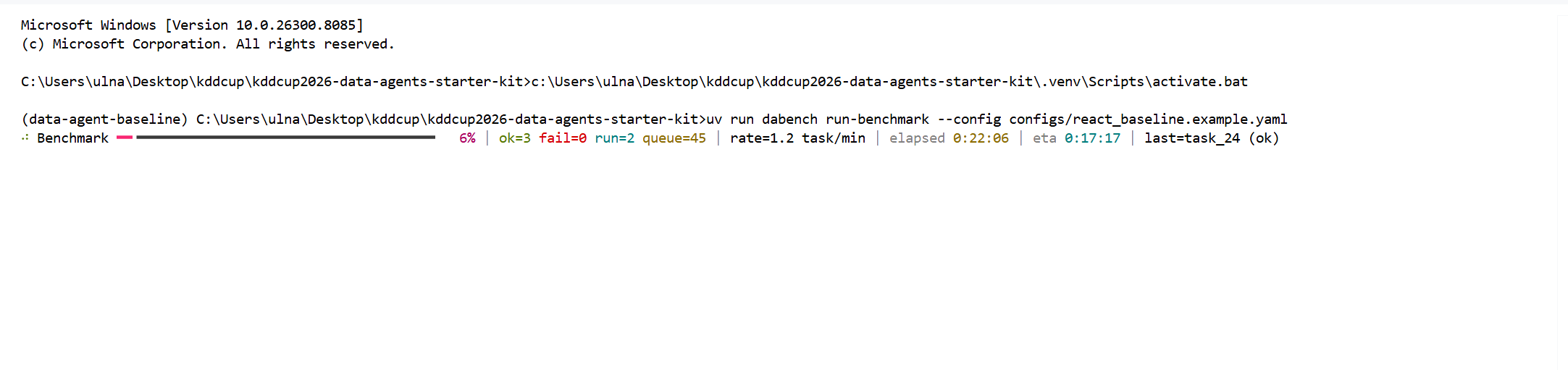
持续运行20分钟,暂未出现运行失败,已经成功求解出了3个问题。
程序2:
- 参数:
task_timeout_seconds: 600
代码:
# 创建一个多进程队列,作为结果回传通道
queue: multiprocessing.Queue[Any] = multiprocessing.Queue()
# 创建子进程对象
process = multiprocessing.Process(
    target=_run_single_task_in_subprocess,	#指定目标函数
    args=(task_id, config, queue),	# 给子进程传递的参数
)
process.start()		# 启动子线程
process.join(timeout_seconds)	# 父进程在这里等待子进程结束,最多等待timeout_seconds秒

if process.is_alive():	#判断子线程是否还或者
    process.terminate()	#终止子线程
    process.join(timeout=1.0)
    if process.is_alive():
        process.kill()
        process.join()
    # 返回一个失败的结果
    return _failure_run_result_payload(task_id, f"Task timed out after {timeout_seconds} seconds.")

if queue.empty():	# 如果子进程已经结束,就检查queue中是否有结果。
    exit_code = process.exitcode    #获取子进程的退出码
    if exit_code not in (None, 0):  #如果退出码是异常值则返回失败结果
        return _failure_run_result_payload(
            task_id,
            f"Task exited unexpectedly with exit code {exit_code}.",
        )
    # 没有结果也返回一个失败结果
    return _failure_run_result_payload(task_id, "Task exited without returning a result.")
result = queue.get()    # 从queue中取出子进程放回来的结果
if result.get("ok"):	# 检查从queue中取出来的结果
    return dict(result["run_result"])    # 成功返回
# 失败返回
return _failure_run_result_payload(task_id, f"Task failed with uncaught error: {result['error']}")
执行情况如下:
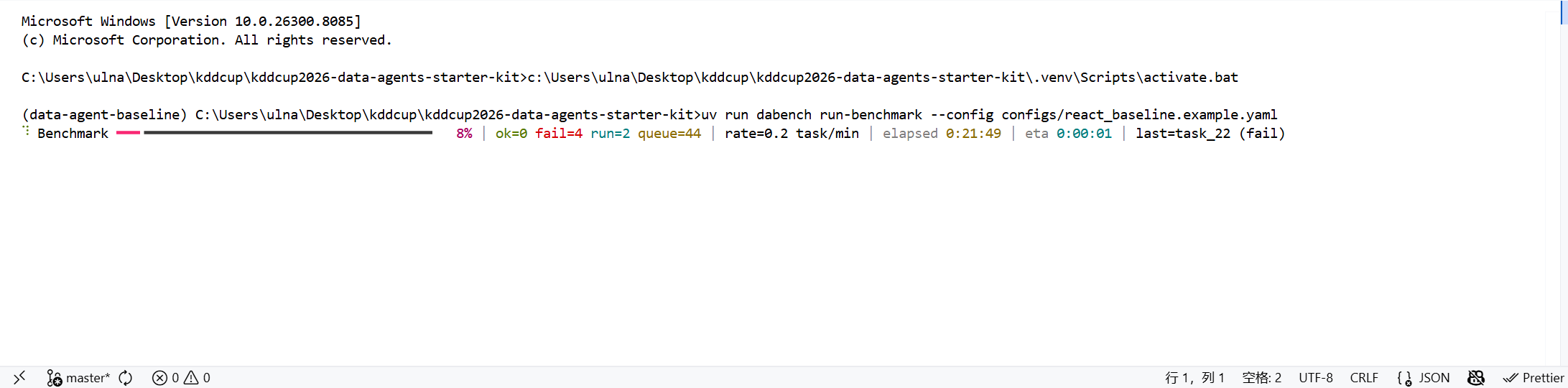
持续运行20分钟,所有的问题都超时执行失败。
问题原因分析
为了找出问题的原因,首先我们需要来看看当 task_timeout_seconds > 0 时,程序多做了些什么。
通过阅读代码以及注释,相比 task_timeout_seconds <= 0时,程序多做了这些额外工作:
- 创建了一个子进程
- 创建了一个进程间通信队列
- 多了一层”父进程计时监督”
- 多了一层”超时后强杀子进程机制”
- 多了一层”把结果从子进程传回父进程”的序列化/反序列化过程
- 多了一组新的失败路径:超时、异常退出、无结果返回。
通过查看程序2的任务失败日志:
{
  "task_id": "task_11",
  "answer": null,
  "steps": [],
  "failure_reason": "Task timed out after 600 seconds.",
  "succeeded": false,
  "e2e_elapsed_seconds": 600.028
}
我们就可以将问题锁定在:**子进程超时后被强制杀掉。**但是通过实验1的现象,在600秒内完成任务明明是绰绰有余的。
借助GPT-5.4的力量,我们找到了最终问题的答案:
- Windows环境下典型的
multiprocession.Queue,假超时/死锁路径。
问题模式如下:
- 子进程往Queue放了数据后
- 父进程如果先
join()、不把queue里的东西取走 - 子进程可能一直退不出来
为了精准复现这个问题,我们写了一段复现代码:
import multiprocessing as mp


def worker(queue: mp.Queue, payload_size: int) -> None:
    queue.put({"data": "x" * payload_size})


def main() -> None:
    for payload_size in (1024, 4096, 8192, 16384, 32768, 65536):
        queue: mp.Queue = mp.Queue()
        process = mp.Process(target=worker, args=(queue, payload_size))
        process.start()
        process.join(5.0)
        print(
            f"payload_size={payload_size} alive_after_join={process.is_alive()} "
            f"exitcode={process.exitcode} queue_empty={queue.empty()}"
        )
        if process.is_alive():
            process.terminate()
            process.join()
            print(f"payload_size={payload_size} terminated_after_timeout")
        else:
            if not queue.empty():
                queue.get()
                print(f"payload_size={payload_size} get_ok")


if __name__ == "__main__":
    main()
执行结果如下:
payload_size=1024 alive_after_join=False exitcode=0 queue_empty=False
payload_size=1024 get_ok
payload_size=4096 alive_after_join=False exitcode=0 queue_empty=False
payload_size=4096 get_ok
payload_size=8192 alive_after_join=True exitcode=None queue_empty=False
payload_size=8192 terminated_after_timeout
payload_size=16384 alive_after_join=True exitcode=None queue_empty=False
payload_size=16384 terminated_after_timeout
payload_size=32768 alive_after_join=True exitcode=None queue_empty=False
payload_size=32768 terminated_after_timeout
payload_size=65536 alive_after_join=True exitcode=None queue_empty=False
payload_size=65536 terminated_after_timeout
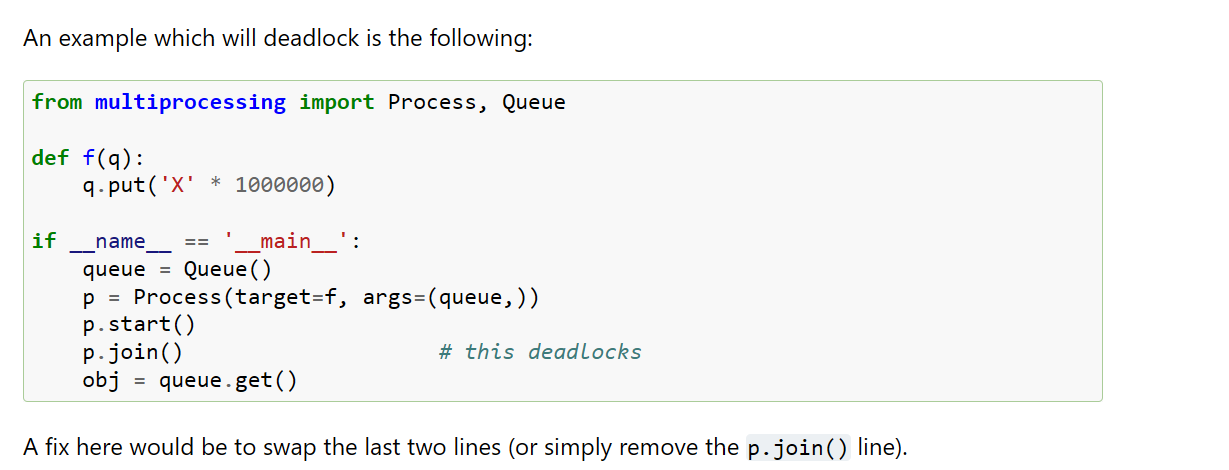
当子进程往 multiprocessing.Queue放大约 8kb以上的数据,父进程如果先 join()在 get(),子进程就会一直活着,最后只能被外层当超时杀掉。
而当任务成功时,trace大小以及远远超过这个量级:
- 20260331T025417Z/task_11/trace.json 约 33 KB
- 20260331T025417Z/task_22/trace.json约 32 KB
- 20260331T025417Z/task_25/trace.json约 102 KB
此事在python官方文档中亦有记载:
multiprocessing — Process-based parallelism — Python 3.14.3 documentation
修改方案:将 _run_single_task_with_timeout函数替换为以下版本:
# 为单任务执行增加进程级超时控制和异常退出处理。
def _run_single_task_with_timeout(*, task_id: str, config: AppConfig) -> dict[str, Any]:
    timeout_seconds = config.run.task_timeout_seconds
    if timeout_seconds <= 0:
        return _run_single_task_core(task_id=task_id, config=config)

    queue: multiprocessing.Queue[Any] = multiprocessing.Queue()
    # 子进程隔离了模型和工具执行,任务卡住时父进程可以直接终止它。
    process = multiprocessing.Process(
        target=_run_single_task_in_subprocess,
        args=(task_id, config, queue),
    )
    process.start()
    try:
        # 先等待子进程把结果放进队列,再回收子进程;否则在某些平台上会因为
        # 大对象仍滞留在 Queue 管道中,导致 join() 误判为超时。
        result = queue.get(timeout=timeout_seconds)
    except Empty:
        if process.is_alive():
            process.terminate()
            process.join(timeout=1.0)
            if process.is_alive():
                process.kill()
                process.join()
            return _failure_run_result_payload(task_id, f"Task timed out after {timeout_seconds} seconds.")

        process.join(timeout=1.0)
        exit_code = process.exitcode
        if exit_code not in (None, 0):
            return _failure_run_result_payload(
                task_id,
                f"Task exited unexpectedly with exit code {exit_code}.",
            )
        return _failure_run_result_payload(task_id, "Task exited without returning a result.")
    finally:
        # 父进程负责关闭自身持有的队列句柄,避免后台 feeder 线程悬挂。
        queue.close()
        queue.join_thread()

    process.join(timeout=1.0)
    if process.is_alive():
        process.terminate()
        process.join(timeout=1.0)
        if process.is_alive():
            process.kill()
            process.join()
        return _failure_run_result_payload(task_id, "Task returned a result but did not exit cleanly.")

    if result.get("ok"):
        return dict(result["run_result"])
    return _failure_run_result_payload(task_id, f"Task failed with uncaught error: {result['error']}")
Baseline重点代码分析
ReAct主循环
在react.py中定义了一个ReActAgent的类:
class ReActAgent:
    # 初始化 agent 时注入模型、工具集合以及可覆盖的 system prompt。
    def __init__(
        self,
        *,
        model: ModelAdapter,
        tools: ToolRegistry,
        config: ReActAgentConfig | None = None,
        system_prompt: str | None = None,
    ) -> None:
        self.model = model
        self.tools = tools
        self.config = config or ReActAgentConfig()
        # 未显式指定时,使用 prompt.py 中定义的默认 ReAct system prompt。
        self.system_prompt = system_prompt or REACT_SYSTEM_PROMPT
	...
以及有一个ReAct的主循环:
def run(self, task: PublicTask) -> AgentRunResult首先我们先来认清这几个角色:
task:当前任务本身,里面有题目和context/路径state:运行过程中的笔记本,记录以及走过的步骤、有没有答案、有没有失败。self.model:大模型,负责决定下一步做什么self.tools:工具箱,负责真的去读文件、跑python、差数据库AgentRunResult:最后返回的结果对象,给runner去写trace.json和prediction.csv。
按照执行顺序拆开讲:
state = AgentRuntimeState()这行是在创建一个“空白运行状态”。
其结构如下:
# Agent 在一次任务执行过程中的可变状态。
@dataclass(slots=True)
class AgentRuntimeState:
    steps: list[StepRecord] = field(default_factory=list)
    answer: AnswerTable | None = None
    failure_reason: str | None = None
for step_index in range(1, self.config.max_steps + 1):这里对应配置文件中 max_step的设置,限制每个任务最多走max_steps这么多步。如果一直到最后一步还没有得出答案,则该任务会被判定失败。
raw_response = self.model.complete(self._build_messages(task, state))这一步做了两件事:
self._build_messages(task, state):把当前上下文拼出来。self.model.complete():让模型给出下一步指示
_build_messages:把 system prompt、任务问题和历史 observation 组装成当前轮次的消息列表。
模型返回的是一段文本比如:
```json\n{\"thought\": \"First, I need to explore the context directory to understand what data is available. Then I'll look for information about patients, thrombosis severity, and diagnoses.\", \"action\": \"list_context\", \"action_input\": {\"max_depth\": 4}}\n```model_step = parse_model_step(raw_response)这行代码会将文本解析为结构化的对象:
    return ModelStep(
        thought=thought,
        action=action,
        action_input=action_input,
        raw_response=raw_response,
    )
tool_result = self.tools.execute(task, model_step.action, model_step.action_input)这里是模型出注意,程序负责执行的分界点,程序将会加载模型指定的工具和参数,开始执行Action。
observation = {
    "ok": tool_result.ok,
    "tool": model_step.action,
    "content": tool_result.content,
}
这一步在整理动作的执行结果:
- 成功没:ok=True
- 用了哪个工具:tool=“list_context”
- 工具返回了什么:content=文件列表
# 将 thought / action / observation 全量记录下来,便于 trace 复盘。
step_record = StepRecord(
    step_index=step_index,
    thought=model_step.thought,
    action=model_step.action,
    action_input=model_step.action_input,
    raw_response=raw_response,
    observation=observation,
    ok=tool_result.ok,
    )
state.steps.append(step_record)
这两步将把这一轮的所有信息记录下来,用于模型在一轮中观察结果,继续推理或给出答案。
if tool_result.is_terminal:
    # 一旦工具返回终止信号(通常是 answer 工具),保存答案并结束循环。
    state.answer = tool_result.answer
        break
在prompt中有这样一句话:
3. The task is complete only when you call the `answer` tool.
当模型认为任务结束时,就调用answer工具。而answer工具会返回 is_terminal=True,这时agent就停止。
except Exception as exc:
   # 无论是模型输出格式不合法,还是工具执行报错,都作为失败 observation 回灌到历史中;
    # 这样 trace.json 可以完整保留失败现场,模型在后续步数里也有机会自我修正。
    observation = {
        "ok": False,
        "error": str(exc),
    }
    state.steps.append(
        StepRecord(
            step_index=step_index,
            thought="",
            action="__error__",
            action_input={},
            raw_response=raw_response,
            observation=observation,
            ok=False,
        )
    )
try... except是在给错误兜底,它处理两类常见的错误:
- 模型输出格式不对
- 工具执行报错
出错后,这段代码不会立刻让整个任务崩掉,而是做两件事:
- 把错误包装成一条失败 observation
- 把这条错误步骤也写进 state.steps
if state.answer is None and state.failure_reason is None:
    state.failure_reason = "Agent did not submit an answer within max_steps."

return AgentRunResult(
    task_id=task.task_id,
    answer=state.answer,
    steps=list(state.steps),
    failure_reason=state.failure_reason,
)
Function Calling
首先需要说明的是:这个BaseLine中的Function Calling是基于Prompt手动模拟的Function Calling,而没有基于API原生的(Native) Function Calling。
原因:强制增加思考环节
- 原生的Function Calling往往比较直接,模型一旦决定调用工具,就直接输出函数名和参数,缺乏思考过程。而在复杂的Agent场景中,开发者希望强制模型先输出
thought,以此来提高调用工具的准确率。
程序通过 parse_model_step()来把这段文本翻译成程序能用的结构。
函数原型:
def parse_model_step(raw_response: str) -> ModelStep:raw_response:模型原始返回文本ModelStep:一个对象
最终返回的对象:
return ModelStep(
    thought=thought,
    action=action,
    action_input=action_input,
    raw_response=raw_response,
)
工具调度层
模型只负责说,而工具调度层负责真正的做。
具体来说,工具调度层主要负责:
- 找到对应的工具
- 真正执行它
- 把结果包装成统一格式
- 返回给
ReActAgent
这条链路的点在ReAct中:
tool_result = self.tools.execute(task, model_step.action, model_step.action_input)传入参数:
task:当前任务上下文,将模型的工作范围限制在task目录下action:调用工具的名字action_input:传递给调用工具的参数
在 execute()方法中:
# 按工具名分发执行;若模型输出了未知工具名,则直接报错。
def execute(self, task: PublicTask, action: str, action_input: dict[str, Any]) -> ToolExecutionResult:
    if action not in self.handlers:
        raise KeyError(f"Unknown tool: {action}")
return self.handlers[action](task, action_input)- 首先判断action这个工具名在不在handler这张表里。
- 在的话就直接调用对应的python函数
- 不在的话就报错
一旦execute()找到了函数,就会像调用普通函数一样执行:
_read_json(task, action_input)执行任务结束后,每个工具最后都要返回同一种对象:
# 统一封装工具执行结果:是否成功、返回内容,以及是否为终止动作。
@dataclass(frozen=True, slots=True)
class ToolExecutionResult:
    ok: bool				# 执行是否成功
    content: dict[str, Any]		# 返回内容
    is_terminal: bool = False		# 是不是终止动作
    answer: AnswerTable | None = None	# 如果是最终答案,就放这里
搞清楚工具是如何调用之后,我们来看看工具函数是如何在程序中注册的。
工具注册发生在函数:
def create_default_tool_registry() -> ToolRegistry函数不接收任何参数,但是将在最后返回一个 ToolRegistry对象:
class ToolRegistry:
    specs: dict[str, ToolSpec]		# 给模型看的工具说明
handlers: dict[str, ToolHandler] # 真正执行时用的函数映射在这个baseline中不是装饰器注册,也不是自动扫描,而是手动注册。接下来我们分别看看如何在 specs和 handlers中注册工具。
specs = {
    "execute_context_sql": ToolSpec(
        name="execute_context_sql",
        description="Run a read-only SQL query against a sqlite/db file inside context.",
        input_schema={"path": "relative/path/to/file.sqlite", "sql": "SELECT ...", "limit": 200},
     ),
...
...
}
specs中注册的是这个工具的说明信息,是拼接在prompt中给大模型阅读的内容。它的作用包括以下几点:
name:这个工具叫什么description:这个工具是干什么的input_schema:这个工具应该接收什么参数
这个注册信息后续用在 describe_for_prompt()中,拼接在大模型prompt中。
    # specs 负责描述,handlers 负责执行;两者通过同名 key 对齐。
    handlers = {
        "answer": _answer,
        "execute_context_sql": _execute_context_sql,
        "execute_python": _execute_python,
        "inspect_sqlite_schema": _inspect_sqlite_schema,
        "list_context": _list_context,
        "read_csv": _read_csv,
        "read_doc": _read_doc,
        "read_json": _read_json,
    }
这里右边放的不是字符串,而是函数本身。
在python中,函数可以像变量一样保存在字典里。
Prompt工程
当前prompt系统主要解决以下四个问题:
- 让模型知道自己是谁:一个ReAct data agent
- 让模型知道自己能做什么:有哪些工具
- 让模型知道输出必须长什么样:固定的JSON协议
- 让模型记住上一轮发生了什么:把历史observation回灌进入
# 组合 system prompt、工具说明和输出示例,形成每轮请求的完整系统提示。
def build_system_prompt(tool_descriptions: str, system_prompt: str | None = None) -> str:
    # 允许调用方覆盖默认系统提示词,未提供时回退到内置的 ReAct prompt。
    base_prompt = system_prompt or REACT_SYSTEM_PROMPT
    return (
        f"{base_prompt}\n\n"
        "Available tools:\n"
        f"{tool_descriptions}\n\n"
        f"{RESPONSE_EXAMPLES}\n\n"
        "You must always return a single ```json fenced block containing one JSON object "
        "with keys `thought`, `action`, and `action_input`, and no extra text."
)第一层:System Prompt
这一层定义在 prompt.py的 REACT_SYSTEM_PROMPT中:
# ReAct agent 的基础 system prompt,定义角色、工具使用边界和输出格式约束。
REACT_SYSTEM_PROMPT = """
You are a ReAct-style data agent.

You are solving a task from a public dataset. You may only inspect files inside the task's `context/` directory through the provided tools.

Rules:
1. Use tools to inspect the available context before answering.
2. Base your answer only on information you can observe through the provided tools.
3. The task is complete only when you call the `answer` tool.
4. The `answer` tool must receive a table with `columns` and `rows`.
5. Always return exactly one JSON object with keys `thought`, `action`, and `action_input`.
6. Always wrap that JSON object in exactly one fenced code block that starts with ```json and ends with ```.
7. Do not output any text before or after the fenced JSON block.

Keep reasoning concise and grounded in the observed data.
""".strip()第二层:Tool Prompt
这层不是写死在常量中的,而是根据我们之前提到的 create_default_tool_registry动态生成的。
ToolRegistry.specs -> describe_for_prompt() -> system prompt第三层:Example Prompt
这一层也在 prompt.py中直接定义:
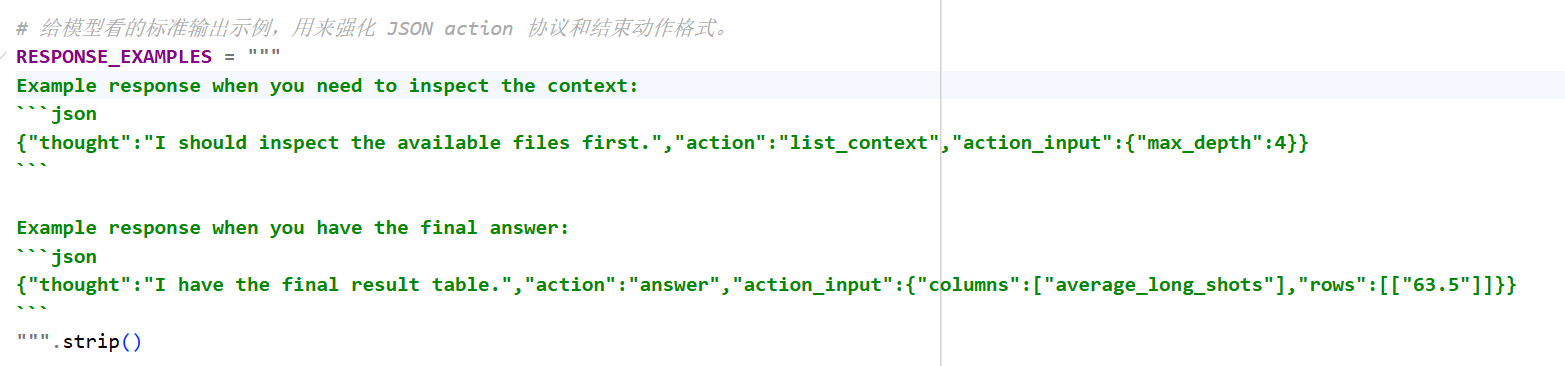
它给了模型两个关键示例:
- 需要继续观察时怎么输出
- 最后提交答案时怎么输出
第四层:Task Prompt & Observation Prompt
Task Prompt:你可以把它理解成“本轮要解的具体题目”。前面的 system prompt 讲的是通用规则,这里的 task prompt 讲的是当前这道题。
# 为当前任务构造用户提示,包含题目本身和最终回答方式的提醒。
def build_task_prompt(task: PublicTask) -> str:
    return (
        f"Question: {task.question}\n"
        "All tool file paths are relative to the task context directory. "
        "When you have the final table, call the `answer` tool."
    )
Observation Prompt:把工具执行结果变成文本,再喂回模型
# 把工具返回的 observation 序列化为文本,作为下一轮推理的输入上下文。
def build_observation_prompt(observation: dict[str, object]) -> str:
    rendered = json.dumps(observation, ensure_ascii=False, indent=2)
    return f"Observation:\n{rendered}"
真实案例task_11运行步骤拆解
问题:
“For patients with severe degree of thrombosis, list their ID, sex and disease the patient is diagnosed with.”
翻译:对于血栓严重程度的患者,列出患者的身份、性别和诊断疾病。
第一步:
"step_index": 1,
"thought": "First, I need to explore the context directory to understand what data is available. Then I'll look for information about patients, thrombosis severity, and diagnoses.",
"action": "list_context",
"action_input": {
    "max_depth": 4  // 最多往下看多少层目录
},
思考:首先,我需要探索上下文目录以了解哪些数据可用。然后我会查找有关患者、血栓严重程度和诊断的信息。
返回结果:
"observation": {
"ok": true,
"tool": "list_context",
"content": {
    "root": "C:\\Users\\ulna\\Desktop\\kddcup\\kddcup2026-data-agents-starter-kit\\data\\public\\input\\task_11\\context",
    "entries": [
    {
        "path": "json",
        "kind": "dir",
        "size": null
    },
    {
        "path": "json/Examination.json",
        "kind": "file",
        "size": 253093
    },
    {
        "path": "json/Patient.json",
        "kind": "file",
        "size": 249904
    },
    {
        "path": "knowledge.md",
        "kind": "file",
        "size": 5291
    }
    ]
}
},第二步:
"step_index": 2,
"thought": "I can see there are JSON files for Examination and Patient, plus a knowledge file. I should first read the knowledge.md to understand the data structure, then examine the JSON files to find the relevant data about thrombosis severity and diagnoses.",
"action": "read_doc",
"action_input": {
    "path": "knowledge.md",
    "max_chars": 4000
},思考:我可以看到有检查和患者的 JSON 文件,以及一个知识文件。我应该首先阅读knowledge.md以了解数据结构,然后检查JSON文件以查找有关血栓严重程度和诊断的相关数据。
然后模型调用读取文档工具,读取了knowledge.md:
第三步:
"step_index": 3,
"thought": "The knowledge.md file shows that Examination has Thrombosis field where 2 indicates severe cases. Patient has ID, SEX, and Diagnosis. I need to join these to get ID, sex, and disease for patients with severe thrombosis (Thrombosis = 2). I should examine the JSON files to understand their structure and then query them. First, let's look at Patient.json.",
"action": "read_json",
"action_input": {
    "path": "json/Patient.json",
    "max_chars": 4000
},思考:knowledge.md 文件显示 Examination 有 Thrombosis 字段,其中 2 表示严重情况。患者有 ID、性别和诊断信息。我需要加入这些来获取严重血栓形成患者的 ID、性别和疾病(血栓形成 = 2)。我应该检查 JSON 文件以了解它们的结构,然后查询它们。首先,让我们看一下 Patient.json。
然后模型调用了读取json文件工具,为了方式数据过长,模型设置 max_chars=4000最长只取前4000个字符,来确认json文件结构。
第四步:
"step_index": 4,
"thought": "Patient.json contains patient records with ID, SEX, and Diagnosis. Now I need to examine Examination.json to find patients with Thrombosis = 2 (severe). Then I can join on ID to get the required fields. Let's look at Examination.json.",
"action": "read_json",
"action_input": {
    "path": "json/Examination.json",
    "max_chars": 4000
},思考:Patient.json 包含包含 ID、性别和诊断信息的患者记录。现在我需要检查 Examination.json 以查找 Thrombosis = 2(严重)的患者。然后我可以加入 ID 以获取所需字段。让我们看看 Examination.json。
了解Patient.json后,模型下一步了解Examination.json的结构。
第五步:
"step_index": 5,
"thought": "I can see Examination.json has Thrombosis field. I need to find all records where Thrombosis = 2 (severe). From the preview, I see ID 163109 has Thrombosis = 2. I need to get all such IDs, then join with Patient.json to get SEX and Diagnosis. Since the JSON files are large, I should write a Python script to load both JSON files, filter Examination for Thrombosis == 2, join with Patient on ID, and extract ID, SEX, Diagnosis. Then produce the final table.",
"action": "execute_python",
"action_input": {
    "code": "import json\nimport os\n\n# Load Patient.json\nwith open('json/Patient.json', 'r', encoding='utf-8') as f:\n    patient_data = json.load(f)\npatient_records = patient_data['records']\n# Create a mapping from ID to patient record for quick lookup\npatient_by_id = {p['ID']: p for p in patient_records}\n\n# Load Examination.json\nwith open('json/Examination.json', 'r', encoding='utf-8') as f:\n    exam_data = json.load(f)\nexam_records = exam_data['records']\n\n# Filter examinations with Thrombosis == 2 (severe)\nsevere_exams = [e for e in exam_records if e.get('Thrombosis') == 2]\nprint(f\"Found {len(severe_exams)} examinations with severe thrombosis (Thrombosis=2)\")\n\n# For each severe exam, get patient info\nresults = []\nfor exam in severe_exams:\n    pid = exam['ID']\n    patient = patient_by_id.get(pid)\n    if patient:\n        results.append({\n            'ID': pid,\n            'SEX': patient.get('SEX', ''),\n            'Diagnosis': patient.get('Diagnosis', '')\n        })\n    else:\n        # If patient not found, still include with unknown sex/diagnosis?\n        # According to question, we need their ID, sex and disease.\n        # If patient record missing, we cannot get sex and disease.\n        # We'll skip or note missing.\n        print(f\"Warning: Patient ID {pid} not found in Patient.json\")\n\nprint(f\"\\nResults ({len(results)} patients):\")\nfor r in results:\n    print(r)\n\n# Prepare table for answer\ncolumns = ['ID', 'SEX', 'Diagnosis']\nrows = [[r['ID'], r['SEX'], r['Diagnosis']] for r in results]\nprint(f\"\\nColumns: {columns}\")\nprint(\"Rows:\")\nfor row in rows:\n    print(row)"
},思考:我可以看到 Examination.json 有 Thrombosis 字段。我需要找到 Thrombosis = 2(严重)的所有记录。从预览中,我看到 ID 163109 有 Thrombosis = 2。我需要获取所有此类 ID,然后与 Patient.json 结合以获取 SEX 和诊断。由于 JSON 文件很大,我应该编写一个 Python 脚本来加载这两个 JSON 文件,过滤 Examination for Thrombosis == 2,与 Patient 结合ID,并提取ID、SEX、Diagnosis,然后生成最终表。
在已经掌握所有文件的结构后,模型通过执行python脚本来进行最终的结果查询。
第六步:
"step_index": 6,
"thought": "The Python script found 18 examinations with severe thrombosis, but only 3 patients have matching records in Patient.json. The others have IDs not found in Patient.json, so we cannot include them because we need sex and disease. The final table should have 3 rows. I need to verify that the Diagnosis field from Patient.json is correct (it shows 'SLE' for all three). I should also check if there are any other patients with severe thrombosis that might have been missed due to data truncation in the preview. Let's run a more thorough check by loading the entire JSON files and ensuring we capture all severe thrombosis cases with patient matches.",
"action": "execute_python",
"action_input": {
    "code": "import json\n\n# Load full Patient.json\nwith open('json/Patient.json', 'r', encoding='utf-8') as f:\n    patient_data = json.load(f)\npatient_records = patient_data['records']\npatient_by_id = {p['ID']: p for p in patient_records}\nprint(f\"Total patient records: {len(patient_records)}\")\n\n# Load full Examination.json\nwith open('json/Examination.json', 'r', encoding='utf-8') as f:\n    exam_data = json.load(f)\nexam_records = exam_data['records']\nprint(f\"Total examination records: {len(exam_records)}\")\n\n# Filter severe thrombosis\nsevere_exams = [e for e in exam_records if e.get('Thrombosis') == 2]\nprint(f\"Examinations with Thrombosis=2: {len(severe_exams)}\")\n\n# Get unique patient IDs from severe exams\nsevere_patient_ids = set(e['ID'] for e in severe_exams)\nprint(f\"Unique patient IDs with severe thrombosis: {len(severe_patient_ids)}\")\nprint(\"IDs:\", sorted(severe_patient_ids))\n\n# Match with patient records\nresults = []\nmissing = []\nfor pid in severe_patient_ids:\n    if pid in patient_by_id:\n        p = patient_by_id[pid]\n        results.append({\n            'ID': pid,\n            'SEX': p.get('SEX', ''),\n            'Diagnosis': p.get('Diagnosis', '')\n        })\n    else:\n        missing.append(pid)\n\nprint(f\"\\nPatients with severe thrombosis and found in Patient.json: {len(results)}\")\nprint(f\"Patients with severe thrombosis but missing in Patient.json: {len(missing)}\")\nif missing:\n    print(\"Missing IDs:\", missing)\n\nprint(\"\\nResult rows:\")\nfor r in results:\n    print(r)\n\n# Prepare final table\ncolumns = ['ID', 'SEX', 'Diagnosis']\nrows = [[r['ID'], r['SEX'], r['Diagnosis']] for r in results]\nprint(f\"\\nColumns: {columns}\")\nprint(\"Rows:\")\nfor row in rows:\n    print(row)"
},思考:Python脚本发现了18个有严重血栓的检查,但只有3个患者在Patient.json中有匹配的记录。其他人的 ID 在 Patient.json 中找不到,因此我们不能包含它们,因为我们需要性和疾病。最终表应有 3 行。我需要验证 Patient.json 中的诊断字段是否正确(所有三个字段均显示“SLE”)。我还应该检查是否还有其他患有严重血栓的患者可能由于预览中的数据截断而被遗漏。让我们通过加载整个 JSON 文件来进行更彻底的检查,并确保我们捕获所有与患者匹配的严重血栓病例。
模型再次执行python工具进行复核,这一步不是重新解题,而是在验证上一步的结论是否可靠。
第七步:
"step_index": 7,
"thought": "The analysis confirms there are 3 patients with severe thrombosis that have matching patient records. The result table has 3 rows. I should verify that the Diagnosis field is indeed from Patient.json and not from Examination.json (which also has a Diagnosis field but we need the patient's disease diagnosis). The knowledge.md says Patient.Diagnosis is 'The disease diagnosed in the patient.' So we should use Patient.Diagnosis. Our script uses patient record's Diagnosis. That's correct. Now I need to output the final answer table with columns ID, SEX, Diagnosis. The rows are as shown. I'll call answer with these columns and rows.",
"action": "answer",
"action_input": {
"columns": [
    "ID",
    "SEX",
    "Diagnosis"
],
"rows": [
    [
    163109,
    "F",
    "SLE"
    ],
    [
    4395720,
    "F",
    "SLE"
    ],
    [
    2803470,
    "F",
    "SLE"
    ]
]思考:分析证实,有 3 名患有严重血栓的患者具有匹配的患者记录。结果表有 3 行。我应该验证 Diagnosis 字段确实来自 Patient.json,而不是来自 Examination.json(它也有一个 Diagnosis 字段,但我们需要患者的疾病诊断)。 Knowledge.md 说 Patient.Diagnosis 是“在患者身上诊断出的疾病”。所以我们应该使用Patient.Diagnosis。我们的脚本使用患者记录的诊断。这是正确的。现在我需要输出最终的答案表,其中包含 ID、性别、诊断列。行如图所示。我将使用这些列和行来调用答案。
模型调用answer提交最终表格。
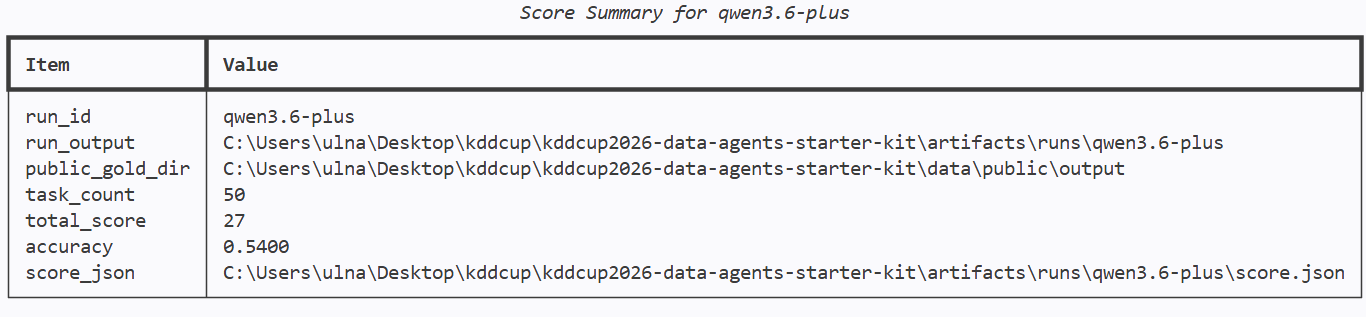
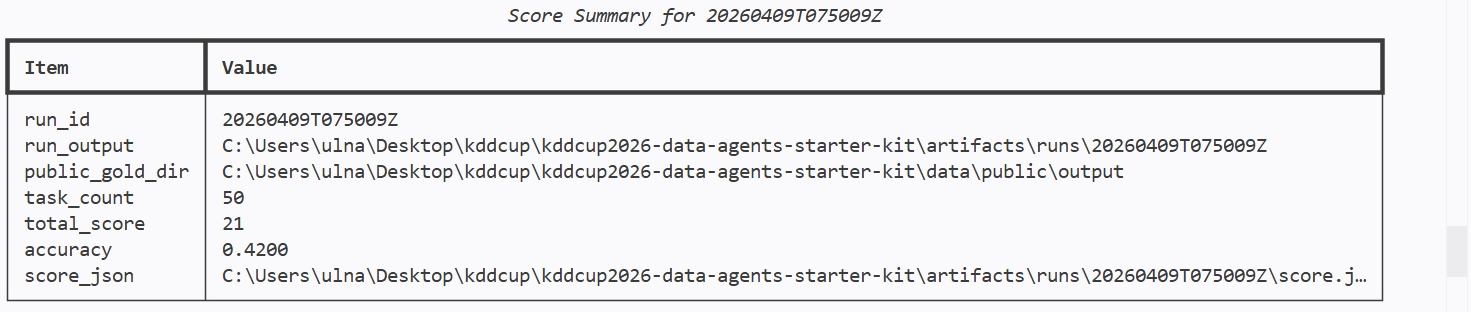
模型对比
这里对比了几种模型使用官方baseline的效果:
deepseekV3.2-chat:
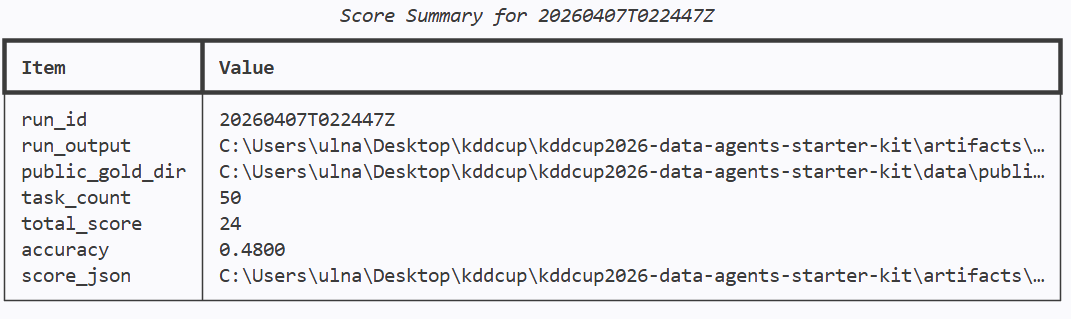
deepseekV3.2-reasoner:
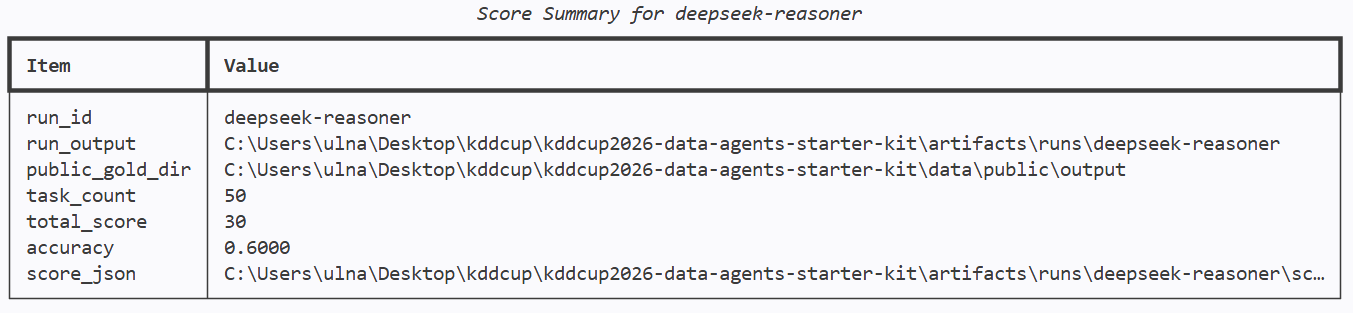
qwen3.6-plus(非思考):
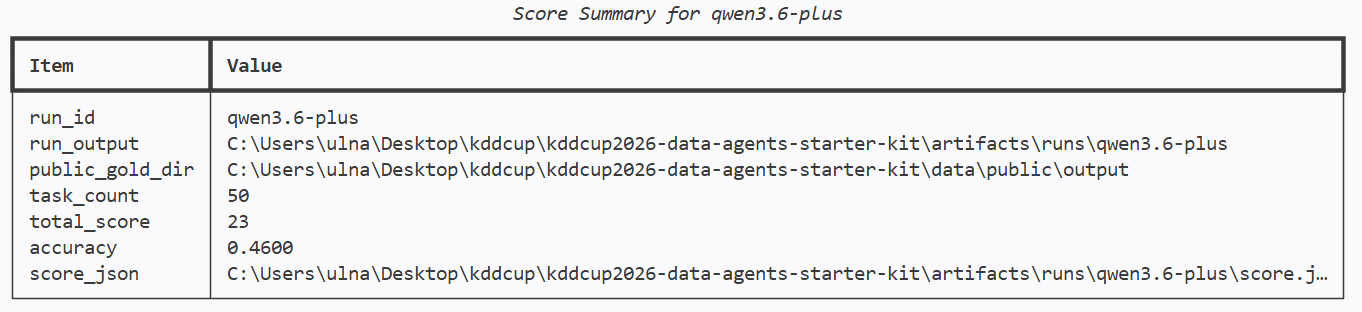
qwen3.6-plus(思考模式):
更新规则后,官方将模型限制为qwen3.5-35b-a3b:
限制模型能力后,更加要求我们对于agent的设计,模型能力如图:
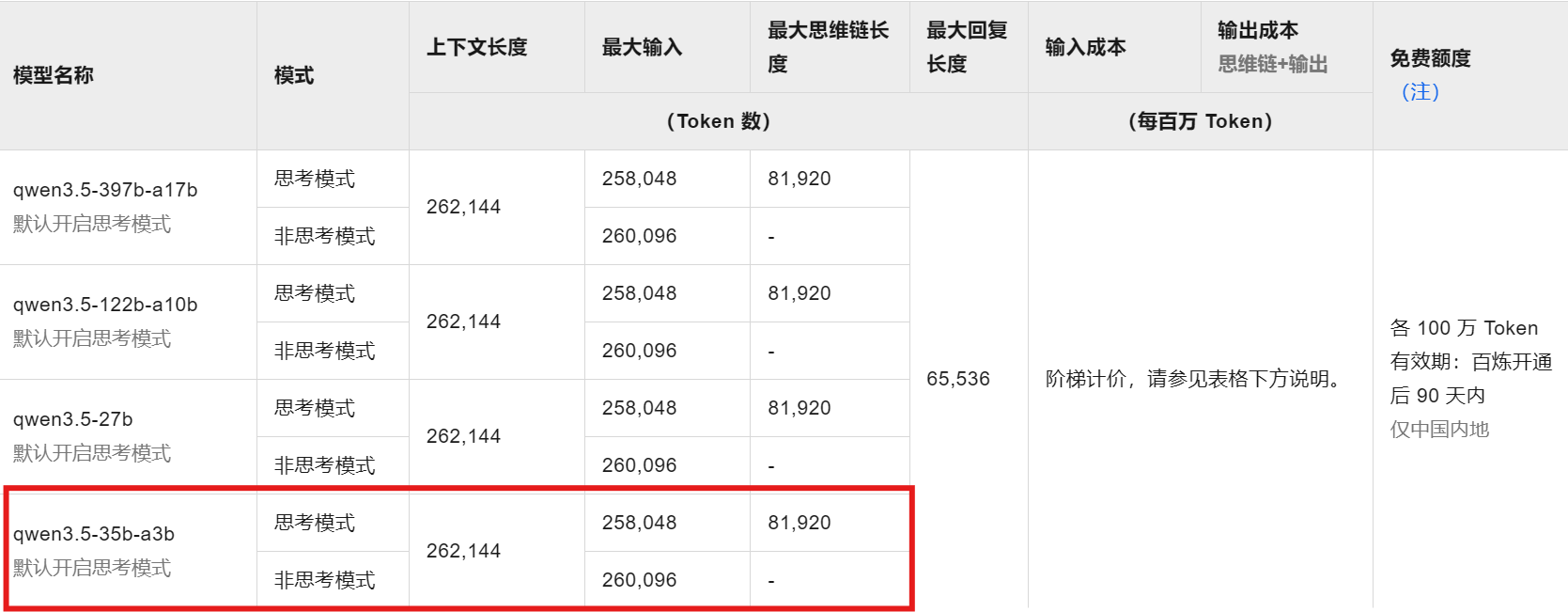
| 维度 | 参数详情 |
|---|---|
| 上下文长度 | 262,144 Tokens(约 256k) |
| 最大输入 | 思考模式下:258,048 Tokens / 非思考模式下:260,096 Tokens |
| 最大思维链 (CoT) | 81,920 Tokens |
| 最大回复长度 | 65,536 Tokens |
当前问题记录
- 当
max_workers设置较大时,如4及以上时,在调用阿里云官网API时会出现达到速率限制而连续多个任务失败的情况:
"Task failed with uncaught error: Model request failed: Error code: 429 - {'error': {'message': 'You exceeded your current quota, please check your plan and billing details. For details, see: https://help.aliyun.com/zh/model-studio/error-code#token-limit', 'type': 'insufficient_quota', 'param': None, 'code': 'insufficient_quota'}, 'request_id': '24bf3dd8-a25b-95df-8b8a-dacee5a9a596'}",- 当
max_steps设置过大时,如64时,在调用模型时会因为输入长度过大导致报错,进而直接导致程序中断:
RuntimeError: Model request failed: Error code: 400 - {'error': {'message': '<400>
InternalError.Algo.InvalidParameter: Range of input length should be [1, 258048]', 'type':
'invalid_request_error', 'param': None, 'code': 'invalid_parameter_error'}, 'id':
'chatcmpl-aafdf92b-b8f7-9d96-a856-92bd9c6a8784', 'request_id': 'aafdf92b-b8f7-9d96-a856-92bd9c6a8784'}